
Home » Download
1333BDT App: Download, Install, and Start Playing on Mobile
Fast, secure 1333BDT app download for cricket fans and JILI slot players
Install once, play anytime. The app is built for quick loads on mobile data, one-tap access to live cricket, and smooth spins on JILI slots. If you search for 1333BDT app download, this page gives you the right steps and the safest path.
You get lighter updates, secure sign-in, and a layout tuned for small screens. Prefer the browser? The app still pairs perfectly with the 1333BDT official site for full account features and support.
Why the app fits BD mobile habits and daily play across sports and slots
Mobile users want speed, trust, and easy control. The app trims extra steps so you can place bets, spin slots, and manage your account without fuss.
Live cricket odds with low delay and quick bet placement
Follow every over, get updated markets, and confirm slips fast during big matches. The app highlights key 1333BDT cricket markets for T20s, ODIs, and domestic leagues.
JILI and leading slots optimized for quick loads
JILI titles and other popular slots open faster, use less data, and keep gameplay stable on most mid-range devices.
Quicker 1333BDT login with OTP and biometrics
Save time with 4-digit PIN, fingerprint, or face unlock. OTP helps you recover access quickly if you switch phones.
Fast local deposits and withdrawals with trusted options
Top up and cash out using methods local players know: bKash, Nagad, Rocket, Upay, and bank transfer. To avoid delays, make sure your profile name matches the sender name on payments.
Notifications and personal limits for better control
Enable alerts for price changes, bet results, and key offers. Set deposit limits and cool-off periods to keep play in check.
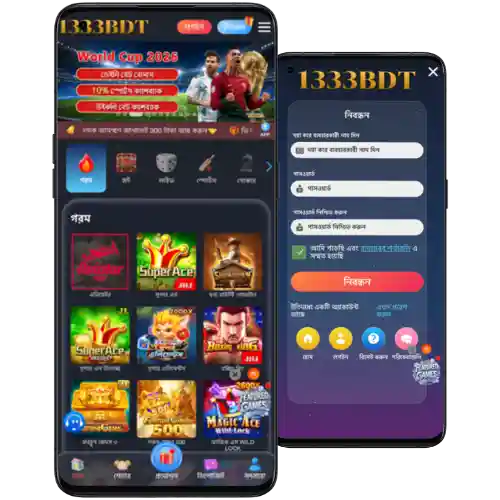
Exact steps to download, install, and start using the 1333BDT APK today
New to the app? Use 1333BDT Register to create your account before or after installing—whatever suits you.
- Go to the official site in your mobile browser and find the App/Download section.
- Tap “Download for Android (APK)”. The file will start saving to your device.
- When prompted, allow your browser (e.g., Chrome) to install apps from this source.
- Open the APK from the download bar or your Files app, then tap Install.
- Launch the app, sign in with your phone number or email, and set a quick PIN.
- Enable notifications to get live cricket updates, bet results, and offer alerts.
- For iOS: Open the site in Safari, tap Share, choose “Add to Home Screen”, then confirm. You’ll get an app-style icon for rapid access.
Quick Android APK download and iOS home screen access instructions
Android: Tap “Download for Android (APK)” and install to get started with the 1333BDT mobile app. It’s light, fast, and built for live action.
iOS: Open the site in Safari, tap Share, then “Add to Home Screen” for an app-like shortcut with full account access.
Mobile features built for speed, control, low data use, and easy navigation
- Fast loads for live cricket scoreboards and in-play markets.
- JILI and featured slots tuned for stable spins on mid-range phones.
- One-tap 1333BDT login with PIN, fingerprint, or face unlock.
- Smart notifications for price boosts, bet results, and event starts.
- Account center with quick ID upload and status tracking.
- Saved favorites for leagues, teams, markets, and slot providers.
- Data-friendly updates that don’t bloat storage.
- Dark mode and clean menus for comfortable night play.

Exclusive app bonuses, reload rewards, and cricket specials that notify you fast
Turn on alerts to hear about odds boosts, reload deals, and targeted offers during big cricket weeks. App users often see faster heads-up on limited-time boosts.
Check the offers page for any welcome or reload 1333BDT bonus. Promotions vary by time and event, so read terms before claiming. For a quick overview, open the app menu and tap Offers to see 1333BDT Promotions.
Safe install checklist, official source verification, permissions, and smart update habits
Only download from official channels. For the cleanest path, follow the site’s App/Download page or use 1333BDT Official Link shared by verified support.
Before installing, check the file name and version on the download page. Avoid third‑party APK mirrors. Keep device security on, and allow installs only for your chosen browser once.
After install, review permissions in Settings. The app needs basic network access and optional notifications—nothing more. Update from inside the app or the official site to stay current and secure.
1333BDT app download and install questions answered in simple steps
Is the app free to download and use?
Yes. Downloading and installing the APK is free. You only pay for bets or games you choose to play.
How do I allow Android to install the APK?
When you tap the APK, Android may ask for permission. Allow installs for your browser (e.g., Chrome) just once. Then return and tap Install.
Is there an iOS version in the App Store?
Use Safari’s “Add to Home Screen” to create an app-style shortcut. It gives fast access with full account features and live updates.
How do I update to the latest version?
Open the app and check for updates in Settings or visit the official site’s App/Download page. Install the new APK over your current one—your data stays intact.
What if the APK doesn’t install?
Confirm the download is complete, free up storage, and allow installs from your browser. If it still fails, re-download from the official site and try again.
Download now and get closer to every over, goal, and spin
Ready for fast live markets and JILI spins on your phone? Start your 1333BDT app download, sign in, and set a quick PIN to jump back in anytime.
Install today to track cricket, place bets in a few taps, and receive timely offers. Keep your app updated for smoother play and the newest features.